
So, you invested in the Elite membership for OnX maps. Property boundaries and dropping pins aside, OnX can be a do-it-all app for any outdoorsperson, hunter or not. Don’t sleep on all the ways you can use your mapping tools for everything from planning a backpacking trip to saving you when you forget an address.

10 Ways OnX Maps Can Make Your Life Easier
Build routes.
This can be done with the snapping tool where the route will automatically snap to pre-existing roads or trails. Or, you can freestyle it and create an off-road route. I like to use this when driving around scouting an unfamiliar area and draw a route that encompasses all the spots I want to look at without constantly having to pull up Google maps and cross-reference where you’re at while driving.
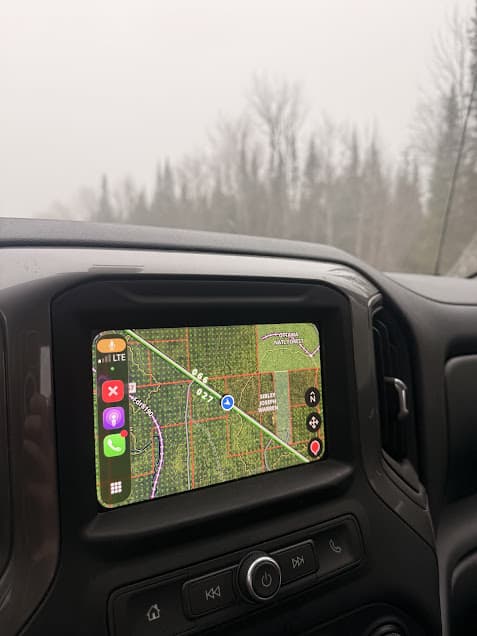
CarPlay.
OnX for CarPlay is the best thing to happen to vehicles since four wheel drive was invented. My driving became significantly safer with my OnX map conveniently displayed on the dash rather than on the phone in my lap that I kept having to grab and reference, zooming in and out of points and two-tracks. On CarPlay, you can drop pins right from the screen as well as track routes.
Navigate to points.
Click on an OnX point and options for navigation to said point in your mapping app will pop up. Instead of having to copy and paste the lat/long into Google Maps, the app will open and create a driving route to the point.
Send Christmas gifts.
Three days before Christmas, I stood in the post office of my small town with a robot gecko that climbs walls and is painted to look like Spiderman, in a box, with my three-year-old nephew’s name on said box. My mind blanked as I stood there twirling a marker, staring into space, trying to remember his address. Like a creeper, I pulled up OnX and zoomed in on the farm where my sister lives, hundreds of miles away. Tax address acquired, written on the box, and a Christmas crisis was averted.
Track everything.
If I am walking off trail, my OnX tracker is on. Drop something? Navigate back the way you came. Two miles deep in the sedge marsh that looked easy on the afternoon hike into the deer spot but in the dark is a twisted maze of willow and dogwood? Retracing your track can keep you from extra hours of stumbling around in the swamp. Returning to a state where you hadn’t been in five years and racking your brain to remember which meadow was it where all those cow elk were in 2019? Saved to your map. Tracking is also helpful for directionality while moving across an unfamiliar landscape.
Cross-reference with other aerial imagery.
OnX is an amazing scouting tool and chances are it’s your go-to when e-scouting a new place. But running some of the locations you scouted on OnX through another mapping tool like Google Earth can show different imagery and extra information you won’t get from simply using OnX’s imagery.
Color code recurring trips by year.
Every year, I spend 3-5 days shed hunting the same county. All points and routes from 2021 were colored blue, 2022 were green, 2023 were pink, etc. It makes it fun and informative to look back and see spots where shed antlers were consistently found each year and new areas were explored.
Calculate acreage for planning habitat projects.
Use the area calculator tool to measure food plots for ordering seed.
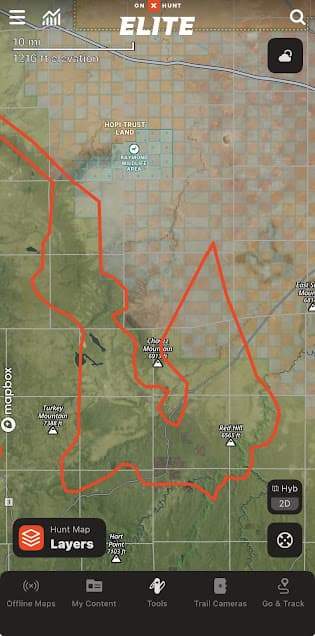
Upload data from other sources.
You can find or create GPX files for trail running courses, snowmobile trail networks, canoe trip routes, etc. You can upload these files into OnX so they appear on your map overlaid with your other pins and across land ownership. I try to do this as much as possible so that I’m not constantly flipping between (and paying for) a million different mapping apps. If I can put a route in OnX, that’s where it’s going.
Plan hiking and backpacking trips.
The route builder option lets you play around with different options for planning routes for backcountry trips. Get accurate mileage and scout for potential campsites along the way. Download your route for access offline to consult if needed (but always have the paper map on you, too).
Pingback: 5 Thundering U.P. Waterfalls in One Hike: Black River, Michigan - the lupine